If the battery charger is indicating the green light, then it has fully charged the battery pack by raising the battery pack voltage to 87-95 volts. This would mean that the dash display is incorrect. It can be for two reasons.
First check the internal state of charge settings by:
- Turning the ignition key on.
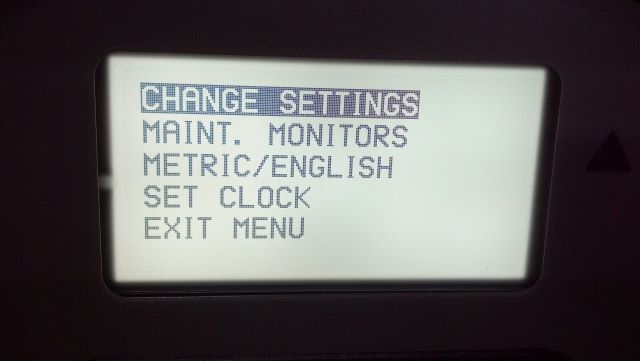
- Press and hold the enter button on the dash display. The enter button looks like a play button or right arrow. Left button. Press until the menu screen comes up looking like this:
Use the up/down arrows to highlight "CHANGE SETTINGS". Press enter button.
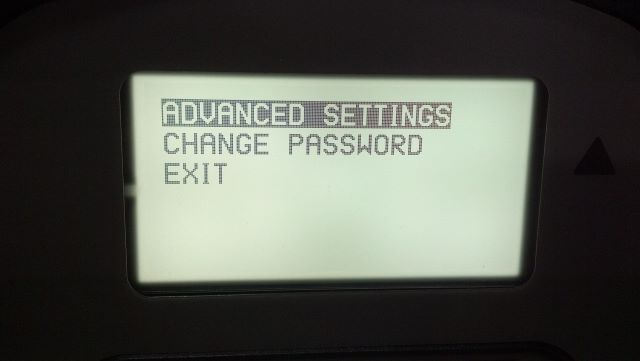
Use the up/down arrows to highlight "ADVANCED SETTINGS". Press enter button.
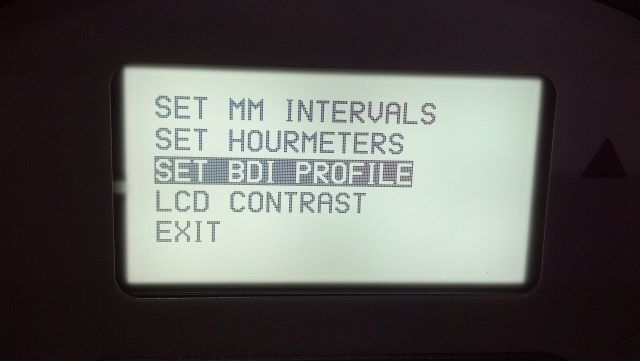
Use the up/down arrows to highlight "SET BDI PROFILE". Press enter button.
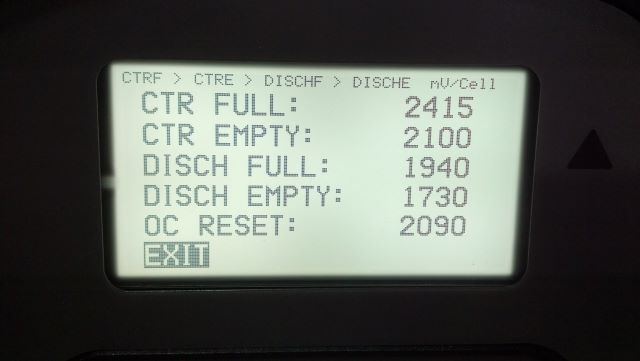
Check your settings and adjust them to match the numbers shown here. Use the up/down arrows to highlight the one needing changes. Press enter button to select. Use up/down arrows to adjust number. Press enter button to set new setting. After complete use exit to back out of screens.
If this is not an issue or does not resolve the issue at the large connector at the back of the dash display pin #17must have a white wire suppling pack ground to it. The terminal may not be making contact with the display. This ground input to pin# 17 must be present or the display will default to an 80-volt mode resulting in the state of charge meter not working correctly.
If neither of these resolve your issue and you know the battery pack does not have any issues, then the dash display is defective and needs replacement.